

This year Apple took a step back from new features and spent more time on software refinement. Things are faster, battery life is better, and lots of little annoyances have been addressed. I do not recommend every major Apple update this strongly. Version 27 is different. It is the best update Apple has made in years and a massive improvement over version 26.
Summary
- I recommend that almost everyone install the version 27 updates fairly quickly, especially if you are having trouble with your devices, as there is a good chance this update will address them.
- There is no single blockbuster feature. Instead, Apple has made its software faster, more reliable, easier on batteries, and less frustrating to use.
- Siri AI arrives in beta form for English users.
- If you are cautious about major updates, waiting for version 27.1 is perfectly reasonable.
My recommendation applies to all of Apple’s version 27 updates: iOS, iPadOS, macOS, watchOS, tvOS, visionOS, and HomePod.
Why is version 27 worth installing right now?
Battery life, speed, and reliability help everyone. Apple says apps on iPhone and iPad can launch up to 30 percent faster, new photos can appear up to 70 percent faster, and AirDrop transfers can be up to 80 percent faster. Search is more dependable, moving between Wi-Fi and cellular is smoother, and everyday glitches are less common.
What new features does it have?
Though the biggest changes are just little tweaks, refinements, things that make your device run faster and use less battery, we do get a handful of small new features worth making note of:
- Siri AI enters beta for English, making Siri significantly more powerful (requires a compatible device and opting in). Check back for a future article on the specifics.
- Photo extend and reframe to adjust your images after taking them. Along with a more capable Clean Up. Apple Intelligence required.
- Liquid Glass improvements such as easier readability, better visuals, and a slider to choose how transparent the glass is.
- iPhone Handoff allows you to instantly switch cellular service between two compatible phones just by picking up the one you want to use. T-Mobile is offering it for $5/month at launch. Verizon to come later this year.
- Apple Cash Bill Splitting allows you to snap a photo of a receipt and send it to a friend for them to pay you back with Apple Cash. They select the items that are theirs, and Apple Intelligence calculates.
- Hide Location allows you to temporarily block your location in the Find My app.
- Separate alarm and timer volume control on iPhone lets you set the volume for alarms and timers specifically.
- CarPlay Video allows you to watch videos with compatible apps in compatible cars on the in-car display while parked. No compatible cars have been announced yet. This will be especially useful for people waiting for their car to charge.
- Photos Shared Album improvements mean that Android and Windows users can join and contribute, and albums will share at full quality.
- Adaptive Audio fine tuning for AirPods in the volume adjuster
- Large-format iPhone Mirroring allows you to use compatible apps in a larger iPad-like screen
Updates for older software
But what if you aren’t ready to update right now, or your devices aren’t compatible? Apple has you covered. The following security and bug fix updates were also released today. You’ll notice that macOS Sonoma didn’t get an update, as its final security patch was last month.
- iOS 26.7
- iPadOS 26.7
- macOS Tahoe 26.7
- macOS Sequoia 15.8
Should you wait for version 27.1?
If major updates make you nervous, waiting for 27.1 is a sensible choice. I do not think most people need to wait this year, but you should be more careful if you depend on specialized work software, medical or accessibility equipment, or an older printer or scanner. As far as I’m aware, mainstream apps are all ready.
How to install the version 27 updates
Back up your devices first, update your apps, and connect portable devices to power. Then:
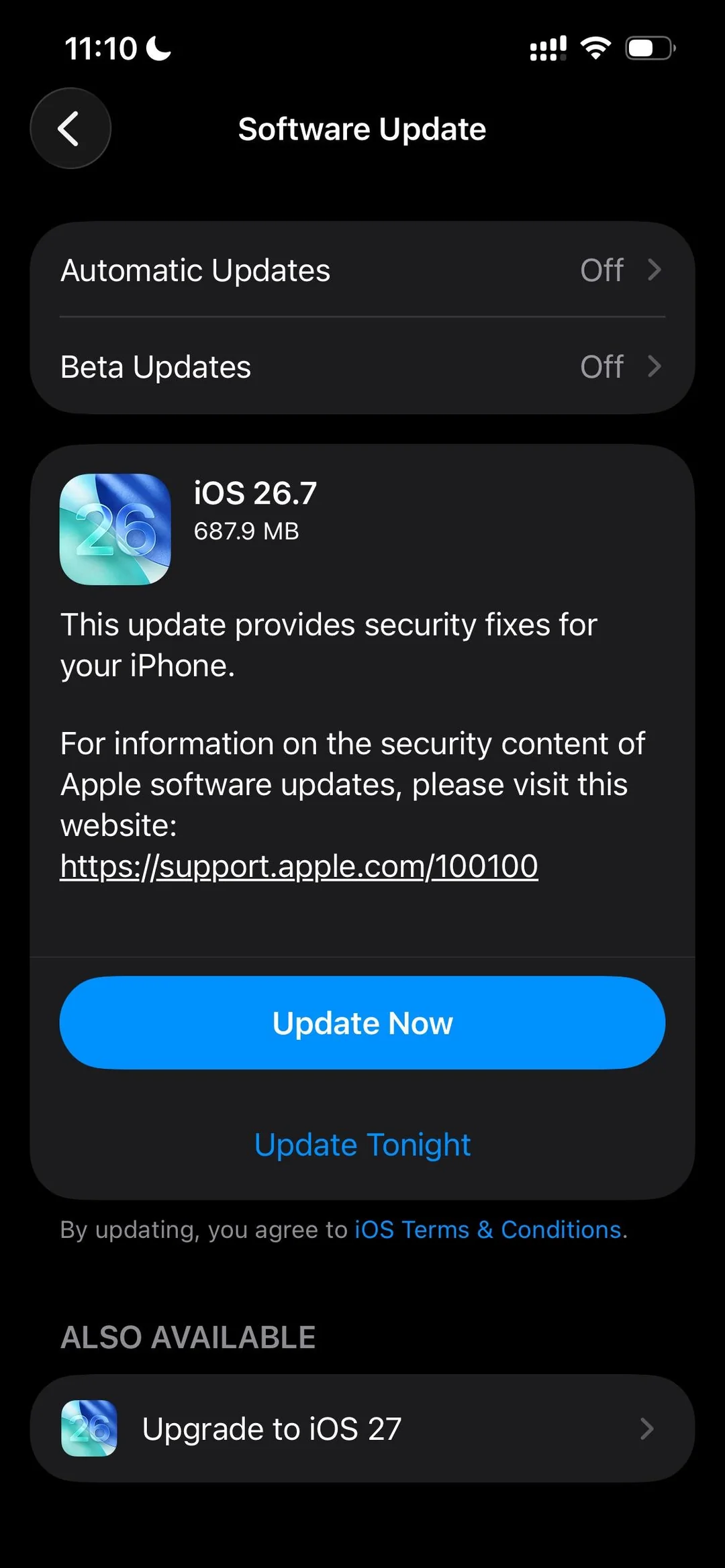
- On an iPhone, iPad, or Apple Vision Pro, open Settings > General > Software Update. If the update offered is 26.7, you may need to look to the bottom of your screen or scroll down to see the button to upgrade to 27.
- On a Mac, choose Apple menu > System Settings > General > Software Update.
- On an Apple Watch, update its paired iPhone first. Then open the Watch app on your iPhone and choose General > Software Update. Make sure the watch is at least 50 percent charged and leave it on its charger while it updates.
- On an Apple TV, open Settings > System > Software Updates > Update Software.
Follow the onscreen instructions and choose a time when you will not need the device for a while. If you would rather have help checking compatibility and updating everything safely, I offer one-on-one Apple support in San Francisco, Washington DC, and over Zoom.