Tips and Guides

I explain what matters in plain English, with practical steps you can use and recommendations based on my experience helping clients.

Showing 181–198 of 589 articles

Mail Gains Welcome Features in iOS 16, iPadOS 16, and macOS 13 Ventura

Mail Gains Welcome Features in iOS 16, iPadOS 16, and macOS 13 Ventura

Email may not be as sexy a way to communicate as modern-day darlings like Messages, Slack, or Microsoft Teams, but it remains the workhorse of business and personal communications because everyone has it. While Apple Mail is a mature app that has long provided the necessary basics, there has been ro

Check the Weather on Your Mac and iPad, Finally!

Check the Weather on Your Mac and iPad, Finally!

At long last, Apple has plugged one of the most inexplicable holes in its app library—the lack of a Weather app for the iPad and Mac. In iPadOS 16 and macOS 13 Ventura, you’ll now find a large-screen version of the iPhone’s iOS 16 Weather app. Locations you enter on one device automatically sync to

Allow/Don't Allow Paste popups driving you crazy on iOS 16? You can disable it

Allow/Don't Allow Paste popups driving you crazy on iOS 16? You can disable it

Each upgrade to iOS and iPadOS brings new security features. In the end, it's better for security but there may be some difficulty along the way. One of the things that iOS 16 introduced is a popup alert asking you if it's okay for an app to read your clipboard (the place things go when you choose &

View and Copy Saved Wi-Fi Passwords in iOS 16

View and Copy Saved Wi-Fi Passwords in iOS 16

The iPhone and iPad have long allowed you to share Wi-Fi passwords with other nearby devices and people as long as they were in your Contacts list. But you couldn’t see those passwords, which is handy for sharing with non-Apple users and devices. On Mac, you have always been able to find them in t

watchOS 9’s New Low Power Mode Could Help Older Apple Watches

watchOS 9’s New Low Power Mode Could Help Older Apple Watches

Until watchOS 9, Low Power Mode on the Apple Watch turned the smartwatch into a dumb watch that only told the time. With watchOS 9 on an Apple Watch Series 4 or later, however, a new Low Power Mode reduces the watch’s capabilities while keeping it largely functional, which could be particularly usef

Add Haptic Feedback to the iPhone Keyboard in iOS 16

Add Haptic Feedback to the iPhone Keyboard in iOS 16

The iPhone has long been able to play clicking sounds when you tap the keys on the virtual keyboard, but that feedback, while sometimes welcome, can become annoying when you’re trying to be quiet. A new feature in iOS 16 provides haptic feedback—tiny taps you can feel in your fingertips as you tap k

Bring Back the Battery Percentage Indicator in iOS 16

Bring Back the Battery Percentage Indicator in iOS 16

Back in 2017, when Apple added the notch to the iPhone X for Face ID, the resulting loss of usable screen real estate caused the company to remove the battery percentage indicator from the status area. Since then, you’ve only been able to estimate how much battery life you had left from the icon; yo

The Many New Lock Screen Customizations in iOS 16

The Many New Lock Screen Customizations in iOS 16

iOS 16 has been out for a bit now. And iOS 16.1 was released earlier this week so it’s likely safe to upgrade. When you take the plunge, the first new feature to check out is the capability to create, customize, and switch among multiple Lock Screens, each with its own wallpaper, clock font, and

Make the current selection more obvious on Apple TV

Make the current selection more obvious on Apple TV

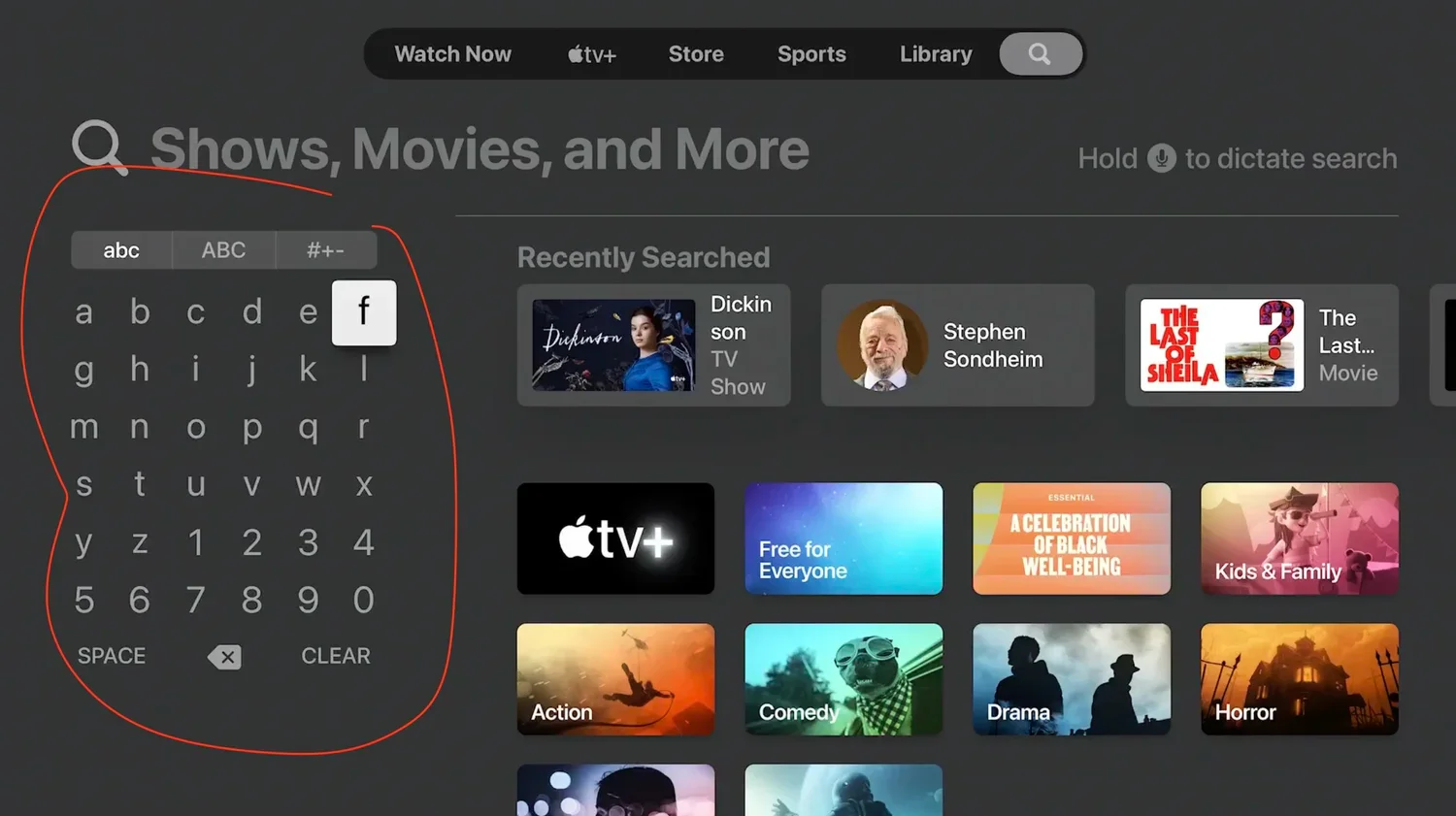
I love my Apple TV. But there is one thing that can drive a lot of people crazy: the currently selected icon or movie can be difficult to discern. It's slightly larger so that it looks like it's floating above the others. As you move around the screen you can tell where the selection is, and if you

SOS cellular in iOS 16

SOS cellular in iOS 16

As you may know, each cell phone company operates its own system of cell phone towers. It's not uncommon, especially in rural areas, to have service with one carrier and not another. Sometimes AT&T works in places where Verizon doesn't or vice versa. What you may not know is that even if y

Don’t Trust an App Fully? Hide Your Precise Location from It

Don’t Trust an App Fully? Hide Your Precise Location from It

Most of the time, having your iPhone know precisely where you are is good. You want Maps to tell you exactly when to turn, not after you’ve passed an intersection. When you call an Uber the driver needs to know exactly where to pick you up. But too many apps abuse their users’ privacy . You may wan

How to Restore Missing SMS Two-Factor Authentication Codes

How to Restore Missing SMS Two-Factor Authentication Codes

Many websites, from Adobe to Zendesk, let you receive two-factor authentication codes via SMS text messages. That’s good—any form of two-factor authentication is better than none—but you’re often effectively locked out of your accounts if those text messages don’t arrive. A simple fix is to call you

Go Beyond Get Info with the Finder’s Inspector Window

Go Beyond Get Info with the Finder’s Inspector Window

You may know that selecting a file in the Finder and choosing File > Get Info (or pres Command-I) brings up the Get Info window. This window provides information about the file, including its name, kind, size, creation and modification dates, and much more. You can also use Get Info to hide o

Follow These Steps before Bringing Your Mac in for Repair

Follow These Steps before Bringing Your Mac in for Repair

It has finally happened. Keys on your MacBook Pro aren’t responding, there’s a crack on the screen, or the battery no longer holds enough of a charge to make it useful. A repair is in your future, which entails bringing the Mac to an Apple Store or Apple Authorized Service Provider or shipping it

What Should I Do If I Get an “AirTag Found Moving With You” Message?

What Should I Do If I Get an “AirTag Found Moving With You” Message?

First, don’t panic. Most likely, you’re borrowing something with an Apple AirTag location tracker attached to it, or someone left something with an attached AirTag in your car. Second, tap the alert to open the Find My app, which displays a map showing where the AirTag has been with you, which mig

Image viewer