


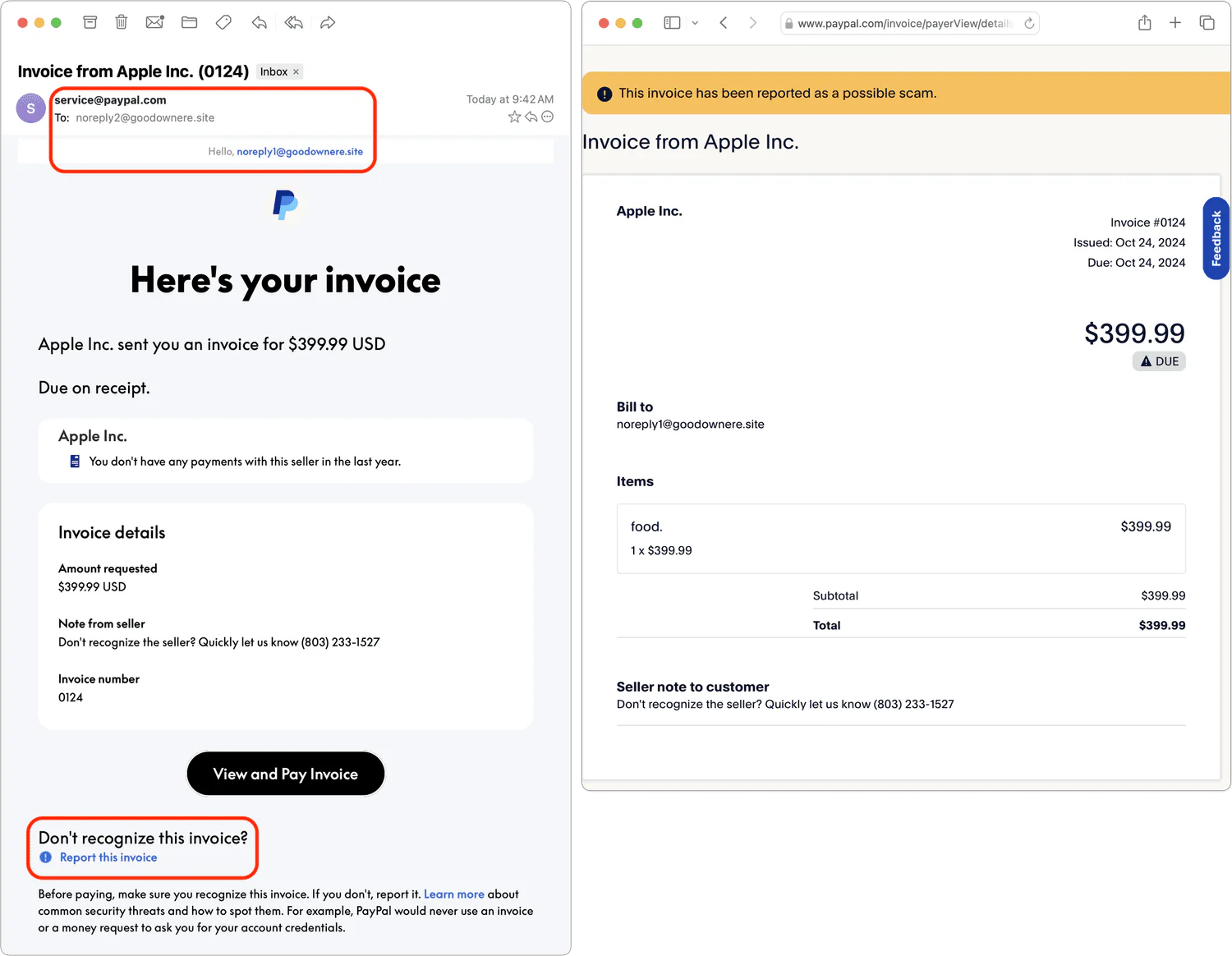
Recently, there’s been an increase in fake invoices sent through PayPal by scammers. Because these fraudulent invoices are dispatched via PayPal’s own system, they often bypass spam filters and lack many of the usual signs of phishing emails. The scammers sign up for a PayPal account and are actually using PayPal to send these out the same way a legitimate business would. However, you can still spot them by checking for unfamiliar or suspicious names and email addresses at the top.
Some scammers even disguise their invoices to appear as if they’re from reputable companies like Apple. It’s crucial never to pay a PayPal invoice that you can’t directly link to a purchase you’ve made. Also, avoid calling any phone numbers listed on these invoices—the scammer may try to convince you the invoice is legitimate or initiate a different scam altogether.
If you receive a suspicious invoice, open the PayPal app or type paypal.com into your browser and sign in directly. Do not use links or phone numbers in the email. On the PayPal website, select the invoice in Activity, choose Report this invoice or Report, and follow the prompts. Forward suspicious email to phishing@paypal.com, then delete it.
Stay vigilant and always double-check any unexpected invoices or payment requests you receive.
(Featured image by iStock.com/Moostocker)